

 Image: PC Welt
At a glance
Expert’s Rating
Pros
Excellent gaming performanceFast refresh rateBeautiful curved, ultrawide screenNice ergonomic adjustment options
Cons
High power consumptionVery expensive
Our Verdict
The LG Ultragear 38GN950 is not a gaming monitor that’s accessible to the masses, but for passionate gamers with big wallets, this ultrawide is a dream. It comes with just about everything you could want in a premium display. Really the only knocks on it are the high power consumption while in use and the fact that it costs an arm and a leg.
Price When Reviewed
999.99
Technically, the LG UltraGear 38GN950 38-inch display is state-of-the-art and delivers incredible gaming performance with frame rates up to 160Hz. But considering you need to shell out almost $1,000, which is the about the same price as a budget gaming computer nowadays, this monitor is out of reach for all but the most hardcore gamers. Still, LG’s behemoth gaming display is worthy of the best gaming rigs.
Note: This review is part of our ongoing roundup of the best gaming monitors. Go there to learn more about competing products, what to look for in a gaming monitor, and buying recommendations.
LG UltraGear 38GN950: The specs
The 38-inch curved display of the LG Ultragear 38GN950 delivers 4K resolution with an ultrawide aspect ratio of 16:9. The fast Nano IPS panel boasts a response time of one millisecond and a refresh rate of up to 160Hz. It also represents 98 percent of the DCI-P3 color range, offers 10-bit color depth, supports HDR10, and is HDR 600 certified.
As with modern gaming monitors, the LG Ultragear 38GN950 works with both synchronization techniques—FreeSync and G-Sync—and can therefore be used flexibly with both AMD and Nvidia graphics cards. It reaches 144Hz, with overclocking at 160Hz, making the screen especially fit for fast games.
Of course, what is a gaming monitor without some RGB lighting, which is tastefully included as a circular LED ring on the backside of the monitor around the screen mount.
LG UltraGear 38GN950: Image quality
In the gaming test, the LG Ultragear 38GN950 is a lot of fun, as the ultrawide curved screen pulls you completely into the game. The immersion was especially noticeable in racing simulations, for example. Even at high frame rates, the LG Ultragear 38GN950 masters demanding, responsive games with ease and delivers a smooth picture without visible input lag and picture errors such as tearing.
The overall excellent image quality with high brightness, good contrast, and very natural color reproduction also contributes to the high level of gaming enjoyment. In addition, technical features, such as a blue light filter, black value increase, flicker-free technology, and “motion blur reduction,” support fatigue-free gaming even over those marathon sessions.
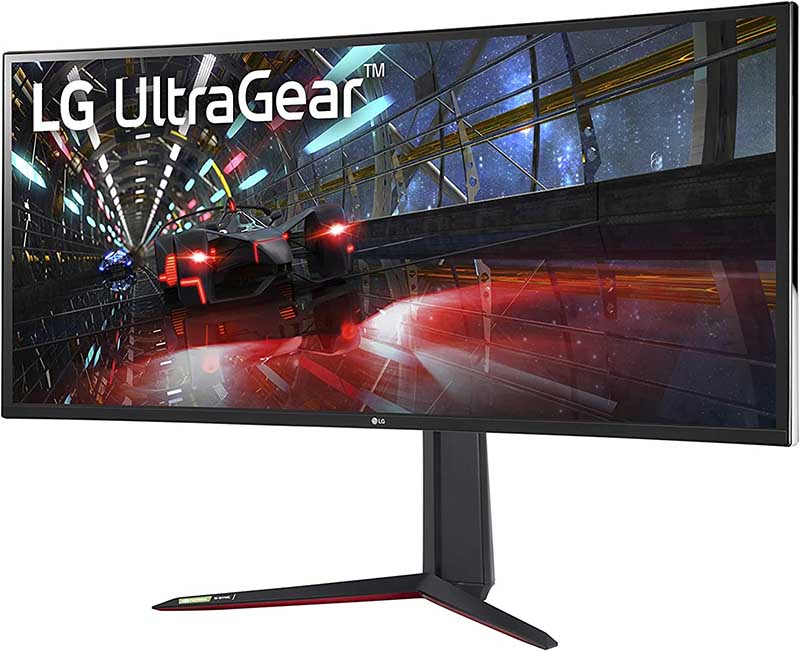
The LG Ultragear 38GN950 is a huge 21:9 gaming monitor with impressive performance.
The LG Ultragear 38GN950 is a huge 21:9 gaming monitor with impressive performance.
PC Welt
The LG Ultragear 38GN950 is a huge 21:9 gaming monitor with impressive performance.
PC Welt
PC Welt
LG UltraGear 38GN950: Ports
When it comes to interfaces, the LG Ultragear 38GN950 is limited to the usual features of current gaming monitors: two HDMI interfaces and a DisplayPort input. There are also two USB 3.0 outputs and a headphone jack, but speakers are not integrated into the monitor.
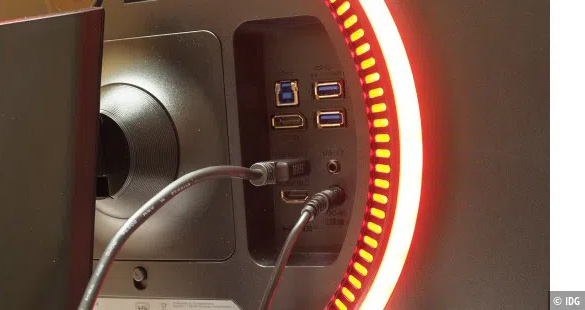
The interfaces are easily accessible on the back of the case.
The interfaces are easily accessible on the back of the case.
PC Welt
The interfaces are easily accessible on the back of the case.
PC Welt
PC Welt
LG UltraGear 38GN950: Features and menu
The LG Ultragear 34GN850 can be adjusted in height by a little over 4 inches and tilted forward and backward, but cannot be rotated on its base. The clear on-screen menu offers numerous game-specific setting options, including various game modes, presets, crosshairs, and FPS.
It is conveniently controlled via a five-way joystick on the right rear of the housing. On another positive note, the interfaces are integrated directly into the back of the case and are very easy to access.
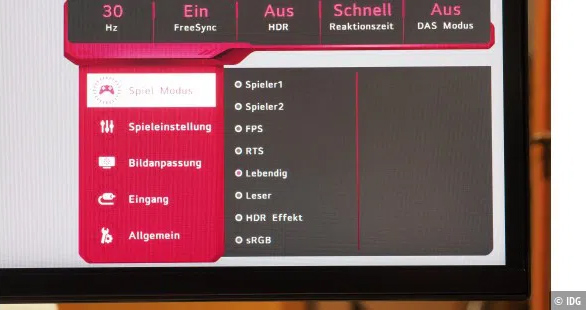
The configuration menu offers numerous settings for gamers.
The configuration menu offers numerous settings for gamers.
PC Welt
The configuration menu offers numerous settings for gamers.
PC Welt
PC Welt
LG UltraGear 38GN950: Power consumption
Due to its size, the LG Ultragear 34GN850 has high power consumption—which is to be expected. We measured around 75 watts at maximum brightness. In standby mode, consumption drops to a low of 0.6 watts
Final thoughts
The LG Ultragear 34GN850 is an impressive gaming monitor that delivers on many fronts. Not only will you have a generous display size, but the quality is also superb. You’ll be able to play the most graphically demanding games with no performance lag or loss of color.
Overall, this display is a terrific gaming monitor, delivering super-fast refresh rates, an immersive curved ultrawide aspect ratio, and fantastic image quality. It’s really expensive, but if you need a monitor worthy of your killer gaming setup, it’s worth the investment.
This review originally appeared on PC-Welt, PCWorld’s German sister site.
Author: Bernd Weeser-Krell
Recent stories by Bernd Weeser-Krell:
AOC AG254FG review: A 360Hz gaming monitor built for the prosViewSonic XG320Q review: A gaming monitor with Quantum Dot technologyLG Ultragear 27GP950 review: A premium 4K 144Hz gaming monitor
About The Author


